

Student Lab 2026
Welcome to the Gillian student lab!
This lab takes the Separation Logic and Compositional Symbolic Execution theory you've seen in the lectures, and re-contextualises it with a semi-automatic verification tool built with Gillian.
Getting started: Personal device
Ensure the following is installed:
- VSCode
- Z3
- This is available on most package managers (
brew,apt-get, etc.) asz3
- This is available on most package managers (
- The current Gillian release: follow the link, then download and extract the relevant
wislandgillian-c2archives for your system
Clone the lab repository and open it in VSCode.
bashgit clone https://github.com/GillianPlatform/gillian-lab.git --branch STUDENT_2026 code gillian-labInstall the Gillian VSCode extension.
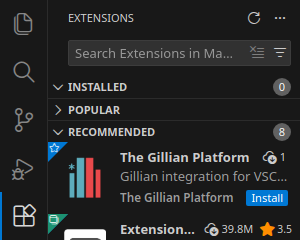
Make sure the extension is set up; in your VSCode settings, under 'Extensions' > 'The Gillian Platform':
- If the
wislandgillian-c2binaries aren't on yourPATH, then set 'Bin Directory' to the directory containing those binaries - If
z3isn't on yourPATH, then under the 'WISL' subsection, set add an environment variableZ3_EXEC, set to the path to thez3binary
- If the
Open an exercise file (such as
0a_intro_auto.wisl); you should see blue underlines that signify verification errors.
Getting started: Lab machine
Copy the lab files to your home directory and open it in VSCode.
bashcp -r /vol/rr/gillian-lab/26/exercises ~/gillian-lab code ~/gillian-labInstall the Gillian VSCode extension.
Open an exercise file (such as
0a_intro_auto.wisl); you should see blue underlines that signify verification errors.
Misc. notes
- The language server highlights compilation errors (and other unexpected problems) in red, and verification failures in blue.
- The debugger supports breakpoints! This can be handy when restarting the debugger after making changes to your code; assign breakpoints to the relevant lines and click the Continue button
 .
- If you get a
SIGPIPEor"Broken pipe"error, try making a small change to your code and trying again.- Note from Nat: I have *absolutely no idea* why this happens. Even with a repro, it disappears if I try to track it down 🙃
- If Gillian seems stuck or unresponsive, or if the WISL language server fails to start, try opening the Command Palette with (
F1orCtrl+Shift+Pby default) and running the "Reload window" command.