

Gillian Lab (for OPLSS '26)
We invite you to try out our Gillian lab exercises, including:
- A suite of introductory WHILE exercises, designed to teach you about verification and applying tactics with Gillian
- A selection of more complex WHILE exercises
- Some C verification exercises, including real-world library code
Getting started
To get set up, follow these instructions:
Clone the lab repository and open it in VSCode.
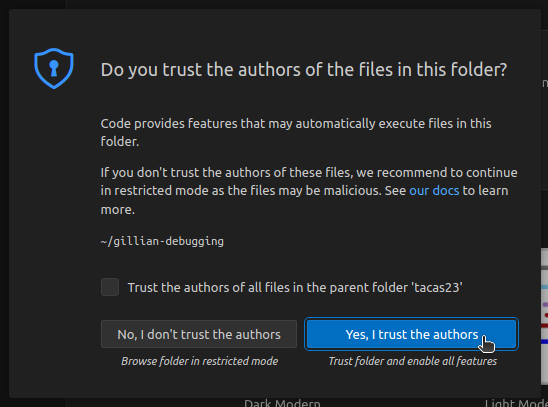
bashgit clone https://github.com/GillianPlatform/gillian-lab.git --branch oplss26 code gillian-labIf necessary, select Yes, I trust the authors.
Launch the dev container by clicking "Reopen in Container" on the popup.
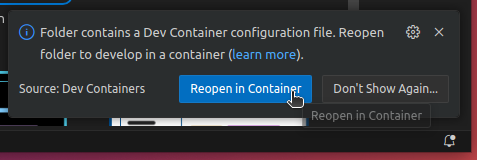
- If you cannot find the popup, open the Command Palette (
F1orCtrl+Shift+Pby default) and select "Dev Containers: Open Folder in Container..." and select thegillian-labfolder.
- If you cannot find the popup, open the Command Palette (
Open an exercise file (such as
0a_intro_auto.wisl); you should see blue underlines that signify verification errors.
Technical notes
- The language server highlights compilation errors (and other unexpected problems) in red, and verification failures in blue.
- The debugger supports breakpoints! This can be handy when restarting the debugger after making changes to your code; assign breakpoints to the relevant lines and click the Continue button
 .
. - If you get a
SIGPIPEor"Broken pipe"error, try making a small change to your code and trying again.- Note from Nat: I have *absolutely no idea* why this happens. Even with a repro, it disappears if I try to track it down 🙃
- If Gillian seems stuck or unresponsive, or if the WISL language server fails to start, try opening the Command Palette with (
F1orCtrl+Shift+Pby default) and running the "Reload window" command.